


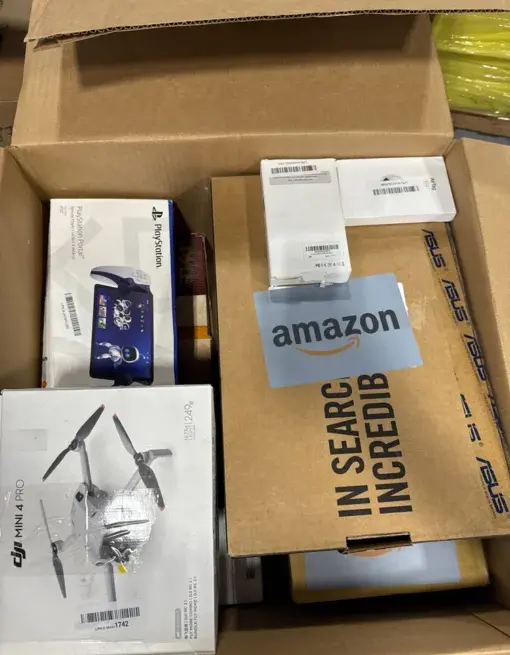
Electronics liquidation pallets reward resellers who have a process. A pallet of mixed gadgets looks like a pile of unknowns on day one, and the difference between a slow, messy pallet and a clean one is how fast you can sort, test and list each unit. This guide lays out the system a working reseller can copy: the station, the checklists, the grading language and the safety rules.
Nothing here depends on one lot or one source. Condition varies by pallet, so treat every figure and example below as a method to adapt, not a promise about what you will find.
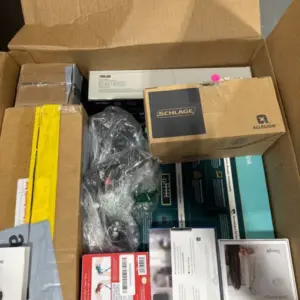
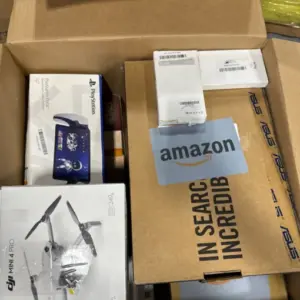
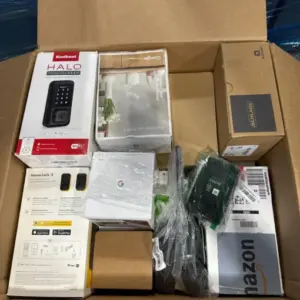
What electronics liquidation pallets usually contain
Mixed electronics pallets tend to span several product families. You will commonly see audio gear (earbuds, headphones, speakers, soundbars), smart home items (cameras, plugs, doorbells, hubs), accessories (cases, chargers, cables, mounts), phones and tablets, laptops, TVs and monitors, and gaming hardware and controllers.
Each listing on our site states the lot size, the stated retail value (MSRP) where the source provides one, and the condition. A manifest or category breakdown is available on request where the source provides one, so ask us before you buy if the mix matters to you.
Build a testing station before the pallet arrives
Set up the station first so nothing sits untested in a corner. A small bench is enough if it holds the right gear.
- Known-good power: a surge-protected power strip and a few chargers you trust, plus USB-C, Lightning and micro-USB cables you have already confirmed work.
- Known-good test devices: a phone, a tablet, a laptop and a TV or monitor you can pair, cast and plug into.
- Consumables: fresh AA and AAA batteries, a few SD cards and a USB drive.
- Labels and tape: a colored label system such as green for tested and working, yellow for needs attention, red for parts only, plus a marker.
- A sorting log: a spreadsheet with one row per unit: item, model number, test result, grade, listing price.
Test with your own known-good chargers and cables rather than whatever came in the box. A failed unit and a failed cable look identical until you swap one.
Per-category test checklists
Use the same checklist every time so results are comparable from unit to unit. This table is a starting point, and you should extend it for the models you actually handle.
| Category | Check | Pass looks like |
|---|---|---|
| Earbuds and headphones | Pair, play audio in both sides, test microphone and charging case | Both sides play evenly, case charges, controls respond |
| Speakers and soundbars | Power on, Bluetooth and wired input, volume sweep | No crackle or cutting out, all inputs work |
| Smart home devices | Power on, reset, see if it enters setup mode | It shows as ready to pair and has no prior account attached |
| Phones and tablets | Screen, touch, cameras, speakers, ports, buttons, charge | Everything responds, no dead zones, charges normally |
| Laptops | Boot, keyboard, trackpad, ports, display, battery, hinge | Boots to setup, all keys work, no screen defects |
| TVs and monitors | Power on, all inputs, remote, dead pixel check on solid colors | Clean picture, sound and inputs working |
| Gaming hardware | Power on, controller sync, disc drive or storage, ports | Boots, outputs video, controllers pair |
| Accessories | Plug in, fit check, count parts | Works with a compatible device, contents complete |
Factory resets, accounts and activation locks
Any device that stores an account needs a reset before it goes up for sale. Run the factory reset from the device’s own settings, then confirm it boots to the first setup screen.
Before you list a phone, tablet, laptop or smart device, verify it is not locked to a previous owner. Activation locks, iCloud-style account locks and device-management locks can make a unit useless to your buyer, so check for a sign-in prompt, a lock screen or a management profile at setup. Never sell a locked device as working. If a unit is locked, list it honestly as a locked unit for parts, or set it aside.
Grade honestly and write listings that match
Grade every unit after testing, and write the listing from your notes, not from the box. Our own lots use Grade A (like new or unused), Grade B (fully working, light wear or damaged packaging) and Grade C (cosmetic damage or needs attention). You can use the same logic for your own resale grades, and our guide to customer returns, overstock and shelf pulls explains how those conditions differ.
- State what you tested and what you did not, for example “powers on, screen and speakers tested, camera not tested.”
- Photograph the actual unit, including scratches, scuffs and the serial or model label.
- List what is included: cable, charger, box, manual.
- Describe wear plainly. Buyers return items when the listing was vague, not when it was blunt.
Parts and repair listings
Some units will not pass, and they can still earn their keep. Sell failed units as “for parts or repair” with a clear description of the fault, such as a cracked screen, no power or a dead port. Do not guess at a cause you have not confirmed.
Keep your repair work to visual checks and a simple power test. Opening devices, repairing circuitry or replacing batteries is specialist work, and it is outside what we would recommend as part of a quick resale process.
Battery safety: the rule you do not bend
Swollen, punctured, leaking or hot lithium batteries are a fire risk. If a device has a bulging case, a lifted screen or a battery that looks damaged, do not charge it and do not try to use it.
Move it to a non-flammable spot away from other stock and anything that burns, and keep it out of a pile of cardboard. Then take it to a battery recycling or hazardous waste drop-off that accepts lithium batteries, following your local rules. Do not throw damaged batteries in the regular trash or ship them to a buyer.
Where each type sells best
Matching the product to the venue saves time. Check each platform’s rules for restricted brands, categories and used-electronics requirements before you list.
- Phones, tablets and laptops: eBay and Facebook Marketplace work well because buyers search by model. Mercari and OfferUp suit local or quick sales.
- Audio and accessories: bundle small items into lots on eBay or sell individually to flea-market and bin-store buyers.
- Smart home devices: list on Amazon or Walmart Marketplace only if you meet each platform’s condition rules, and otherwise use eBay.
- TVs and large items: local sale through Facebook Marketplace saves shipping headaches.
- Gaming: eBay and Whatnot reach buyers who care about specific consoles and bundles.
For ideas on picking venues for the rest of your stock, see where to sell liquidation stock.
Pick your electronics pallet
Start with the category that matches the items you already know how to test. For broad mixes, browse electronics liquidation pallets, Amazon electronics pallets or premium electronics. For one product family, look at iPhone pallets, tablet pallets, laptop pallets, TV pallets, PlayStation 5 pallets or tech accessories. Larger buyers can look at electronics truckloads.
The minimum order is one pallet, freight is free to any country because it is included in the listed price, and US orders arrive by liftgate delivery. Questions about a lot, or a manifest request, go through our contact page. If a delivered pallet is not right, we offer 14-day returns, covered in our refund and returns policy.







Ready to stock up?
Freight is included in every price. Ask us for the latest manifest before you buy.
We use cookies to improve your experience. By continuing, you agree to our cookie policy.
I AcceptYour Cart
All Categories
Search
